TL;DR

Prime made for students and young adults
- Fast, free delivery for dorm and study essentials
- Prime Video and Amazon Music included
- Member-only deals
A compact dorm desk lamp should light your books or keyboard evenly while leaving room for your laptop, water bottle, and notes. Measure the desk, compare the lamp’s footprint and reach, check brightness controls and power requirements, and review housing rules before buying.
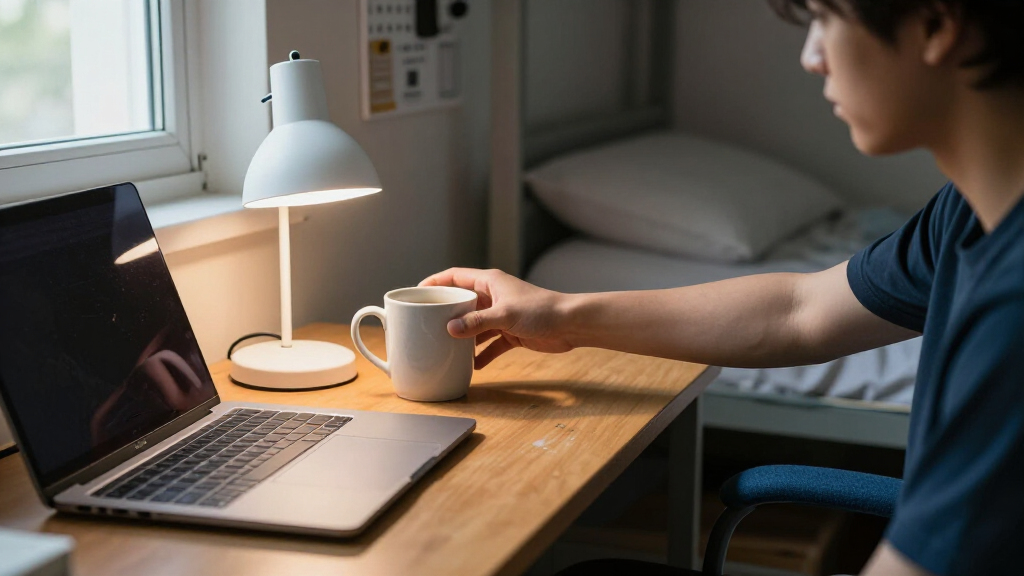
Your desk can look roomy in an empty dorm tour and feel tiny the moment you add a laptop, textbooks, and a mug. A compact dorm desk lamp needs to do more than look small: it should light your work without hogging the one clear patch of desktop you have.
This guide shows you how to compare a lamp’s footprint, reach, brightness, and power before you buy. You’ll also get practical ways to limit screen glare, check dorm rules, and decide whether a clamp, base, or rechargeable model fits your room. The right lamp is a small tool, but on a late study night, it can make the difference between squinting at a page and settling into focused work.
Measure your desktop, the lamp’s base or clamp, its reach, and its folded size; “compact” has no standard measurement.
Choose a clamp only when the desk edge is accessible and compatible; pick a base if you need easy repositioning.
Compare brightness in lumens and choose adjustable output; wattage alone does not show how bright an LED lamp will be.
Aim the beam at your page or keyboard, not your monitor, and route the cord away from drinks and walkways.
Check USB power needs, integrated-LED warranty details, and your residence’s rules before buying.
Measure your desk before choosing a lamp
A compact dorm desk lamp is one that fits your work area without blocking the space you need for your laptop, notes, and daily essentials. Because “compact” has no standard size definition, compare the lamp’s base or clamp dimensions, arm reach, and folded size with your actual desk. A small lamp can still be awkward if its head hangs over your keyboard or its base claims the only spot for your notebook.
Try a quick layout test before shopping: place your laptop where you usually use it, open a textbook beside it, then mark the remaining space with a sheet of paper. If the free area is about the size of a placemat, a wide base may feel like a small boat parked in your workspace. A clamp could leave the surface open, but only if the desk edge is exposed and the clamp fits securely.
Check height and reach, too. A lamp that stands tall but cannot extend over the page may cast light behind your hands. For example, if you write on the left side of a laptop, look for a head that can reach that page without shining directly into the screen.
Before ordering, write down desk depth, clear edge space, and outlet location. Those three measurements turn a vague “looks small” guess into a useful fit check, and they help you avoid returning a lamp that crowds the desk once your books arrive.
As an affiliate, we earn on qualifying purchases.
Choose a base or clamp that suits your setup
A clamp lamp usually saves more desktop space, while a lamp with a base is easier to move and works on desks without a suitable edge. Your choice depends on the furniture you have, not on which design looks sleeker in a product photo. Measure both the lamp and the desk before deciding.
A clamp can be a smart fit when your desk has an accessible, sturdy edge and the clamp’s opening matches its thickness. Imagine a student with a narrow desk, a laptop stand, and a stack of flash cards: clamping the lamp to the back edge keeps the work surface clear. But if the desk sits flush against a wall or has a thick lip, the clamp may not attach at all.
A base model is more flexible. You can move it when you rearrange your desk, bring it to a shared study table, or position it beside a bed for reading. The tradeoff is surface area. A base that seems tiny in a listing can still occupy the spot where you planned to keep a notebook open.
Compare what each style gives you:
- Clamp: frees desktop area, but needs a compatible edge and a secure fit.
- Base: moves easily and suits more furniture, but takes up desk space.
- Foldable design: stores neatly in a drawer or suitcase, but check whether the joints stay steady during use.
Rules vary by school, and residence furniture differs from room to room. If you are unsure whether a clamp or powered accessory is allowed, check your housing guidelines rather than relying on a product listing.
As an affiliate, we earn on qualifying purchases.
Set brightness and color for books, screens, and late nights
A good study lamp gives you even task lighting and lets you change the brightness to suit the work and the room. Look for lumens to compare light output; wattage describes power use and does not directly tell you how bright an LED lamp appears. Dimming often matters more than an impressive maximum brightness, especially when your roommate is trying to sleep.
Color temperature, measured in kelvins (K), describes whether light looks warmer or cooler. Lower values tend to appear warm and soft, while higher values look cooler. Cooler or neutral settings may feel useful when you are checking small details in a diagram, while warmer light can feel gentler during evening reading. Neither setting is automatically right for every person or task.
Picture reviewing handwritten chemistry notes beside a laptop at 10 p.m. A bright beam aimed at the page helps you read, but a high setting pointed across the room can bother a roommate and reflect in the screen. Choose a lamp with several brightness levels if possible, then aim its head down at the page rather than toward the display.
There is no single lumen number that fits every desk: distance, shade design, room lighting, and personal preference change how bright a lamp feels. A useful shopping habit is to compare lumen ratings and choose adjustable output, then test it at the distance where you will actually work. If your eyes keep shifting between a bright page and a dark keyboard, reposition the lamp or add room light rather than simply turning it to maximum.
As an affiliate, we earn on qualifying purchases.
Keep light off your monitor and cords out of your way
Position the lamp so it lights the desk or page, not the screen, and route its cord where your hands and chair will not snag it. A flexible neck or adjustable head helps you direct light onto your work while reducing reflections. The best lamp is easy to reposition and stays steady after you adjust it.
For a simple test, sit in your normal study position and look at the blank or dark part of your monitor. If you see the lamp’s bright shape reflected on the screen, tilt the head toward the desk and shift it to one side. For a right-handed student, a lamp on the left can reduce shadows cast by the writing hand; left-handed students may prefer the opposite arrangement.
A long cable sounds convenient until it loops across the corner where you place your water bottle. Check whether the cord reaches the nearest outlet without stretching, and keep it against the desk edge where possible. USB-powered lamps can be useful, but confirm the input rating and whether the lamp includes a wall adapter. A laptop port or power bank will work only if its output meets the lamp’s requirements.
Run through this setup once the lamp arrives:
- Put your laptop and usual books in their normal spots.
- Aim the light at the page or keyboard, then check the screen for glare.
- Adjust the arm until the beam covers your work without casting a hard hand shadow.
- Route the cord away from drinks, chair legs, and walkways.
- Check that the lamp stays stable after you let go of the head.
This five-minute check can catch a bad angle or awkward cord before a midnight study session makes the problem obvious.
As an affiliate, we earn on qualifying purchases.
Compare power, LEDs, and useful extras
Choose a power style that matches your outlet access and study routine, then treat extras as bonuses rather than the main reason to buy. Plug-in lamps avoid battery-runtime worries, USB models can simplify a setup, and rechargeable lamps work where outlets are scarce. Each choice has a tradeoff that matters more than a long feature list.
LED lamps are common because they use less energy and generally produce less heat than traditional incandescent bulbs. Many compact models use integrated LEDs, though, which can make bulb replacement difficult or impossible. Before buying one, check the manufacturer’s stated lifespan, warranty, and repair options. A lamp that costs a little more may be better value if the maker backs it for longer.
Rechargeable lamps can suit a desk far from an outlet, but runtime depends on battery capacity and brightness. A listing might report a long run time at a low setting, so check whether it gives separate figures for maximum brightness. If you often study for a three-hour block, a lamp that only lasts through one hour at its brightest setting may frustrate you.
Built-in USB ports, timers, memory settings, phone stands, or wireless charging can be handy. Yet a charging pad that occupies the only clear corner can add clutter instead of removing it. Treat the lamp’s core job—comfortable, directed light—as the priority, and verify current features, prices, and availability in product listings because these change over time.
For example, a student who already charges a phone beside the bed may gain little from a lamp with wireless charging, while someone who often loses track of time might appreciate a timer. Buy for the habit you actually have, not the feature you imagine using once.
Check dorm rules and safety before you plug in
Review your residence guidelines before buying or using a desk lamp, because school rules vary and may restrict certain bulbs or electrical devices. A lamp that works safely in one room is not automatically allowed in another. Check the housing handbook or ask residence staff if the wording is unclear.
LED lamps generally produce less heat than traditional incandescent bulbs, but you should still keep the lamp clear of papers, bedding, and fabric. Put it on a stable surface or attach its clamp securely, and avoid placing it where a backpack strap can catch the arm. A student who stacks lecture notes beneath a low lamp may find the paper warms up or blocks the beam; keeping the work zone tidy prevents both problems.
Inspect the power setup, too. Avoid overloading outlets, do not run a cord where people can trip, and keep plugs away from spilled drinks. If you use a USB power bank, follow the lamp’s input requirements and the power source’s rated output instead of assuming every USB port supplies the same power.
When choosing an integrated-LED model, check the warranty and the maker’s lifespan claim, since the light source may not be replaceable. Those details matter if the lamp will serve you through several school years. A clear return policy also helps if the clamp does not fit or the light feels harsher than expected in your room.
Quick rule: measure the fit, check the housing policy, then test the lamp’s stability and cord route before using it for a long study session.
Those checks take less time than packing up a lamp that is too large, incompatible, or not permitted.
Frequently Asked Questions
How bright should a dorm desk lamp be?
Choose a lamp that lights your work area evenly, and favor adjustable brightness so you can tune it to your desk and shared room. Compare lumen ratings rather than wattage alone, and test the light at the distance where you plan to study.
Is warm or cool light better for studying?
Either can work. Cooler or neutral light may feel useful for detailed reading, while warmer light can feel softer in the evening; adjustable color temperature lets you switch to suit the task and your preference.
Should I choose a clamp lamp or a lamp with a base?
A clamp saves desk surface if the desk edge is accessible and the clamp fits securely. A base is easier to move and suits more furniture, but takes up desktop space, so measure before ordering.
Can a USB desk lamp run from my laptop or power bank?
Some USB lamps can, but their power requirements vary. Check the lamp’s input rating and compare it with the laptop port or power bank’s output; also confirm whether the lamp includes a wall adapter.
How do I stop a desk lamp from causing monitor glare?
Aim the lamp head down at your page or keyboard and shift it to the side rather than pointing it at the display. Sit in your usual position and check the screen for reflected light before settling into a long study session.
What should I check before buying a lamp for a dorm?
Measure the desk and check the lamp’s footprint, reach, power cord, and clamp fit. Review your residence rules, then check brightness controls, stability, warranty, and return terms—especially for integrated LEDs that may not allow bulb replacement.
Conclusion
Buy for the desk you have, not the desk shown in a tidy product photo. Measure the space, choose a stable base or compatible clamp, and favor adjustable light that you can aim away from your screen and your roommate.
A well-chosen lamp should feel almost invisible until you need it: a steady pool of light on your open notebook, with the rest of your small desk still yours.
Fall Picks
fall essentials
As an affiliate, we earn on qualifying purchases.