
TL;DR

Prime made for students and young adults
- Fast, free delivery for dorm and study essentials
- Prime Video and Amazon Music included
- Member-only deals
A dorm room that supports both productivity and relaxation hinges on clear zones, smart lighting, ergonomic setup, and clutter control. Small changes can transform your space into a sanctuary for work and rest.
Imagine walking into a dorm room that instantly feels like a refuge rather than a chaos zone. Where your desk invites focus, your bed beckons rest, and everything has its place. You don’t need a huge space or a big budget—just smart choices and a clear plan.
In this guide, you’ll learn concrete ways to carve out zones for work and relaxation, choose furniture that supports good posture, harness light to boost alertness or calm, and keep clutter under control. These small shifts can make your dorm feel like a sanctuary — a place that helps you stay sharp and recharge.
Separate your study and sleep zones visually to train your brain for focus and rest.
Position your desk where natural light is available but glare is minimized for maximum alertness.
Prioritize ergonomic setup—adjust screen height, seat support, and keyboard placement to prevent fatigue.
Layer your lighting with task, ambient, and natural sources to support different moods and activities.
Use vertical and hidden storage to keep clutter at bay, making your small dorm feel larger and calmer.
How to Set Up a Dorm Room for Optimal Productivity and Relaxation
A high-performing dorm room does two opposite jobs well: it invites focused work and makes recovery effortless. Clear zones, strategic light, ergonomic support, and controlled clutter turn limited square footage into a calm home base.
Let the desk signal concentration and the bed signal rest.
Organized surfaces reduce distraction and make it easier to begin.
A rug, shelf, lamp, or curtain can create separation without construction.
Give focus and rest separate addresses
Physical distance helps, but visual distinction is enough to create a useful mental cue. Treat the dorm like a miniature city: each activity gets its own neighborhood and its own signals.
The desk means work
Place it near daylight, orient it toward a wall or uncluttered view, and keep only active study materials within reach.
- Use a focused desk lamp
- Store supplies within arm’s reach
- Move unrelated objects off the surface
- Use a visible “studying” signal
The bed means rest
Reserve the bed primarily for sleep and relaxation. Keep demanding work at the desk so the brain receives a consistent wind-down cue.
- Use warm bedside lighting
- Keep study materials out of sight
- Reduce late-night screen brightness
- Protect quiet, cool, dark conditions
A small rug, narrow shelf, removable wall décor, curtain, or deliberate change in lighting can separate the two zones without sacrificing valuable floor space.
Make good posture the default
Comfort protects concentration. Small adjustments to screen height, reach, back support, and foot position can prevent strain from becoming a recurring distraction.
The five-point posture check
Position the top of the display at or slightly below eye level.
Keep the screen far enough away to view comfortably without leaning forward.
Keep shoulders relaxed and wrists in a neutral position while typing.
Use the floor, a box, or a small footrest to create a stable base.
Add a cushion or rolled towel if the standard dorm chair feels flat.
Adjustment priorities
Raise a laptop with stable books, then pair it with an external keyboard and mouse. Add a rolled towel behind the lower back for immediate support.
Use daylight without inviting glare
Natural light supports alertness, mood, and a stable daily rhythm. The goal is bright surroundings without direct reflections or hard sunlight across the screen.
| Desk position | Focus | Glare risk | Best use | Verdict |
|---|---|---|---|---|
| Window beside the desk | Strong daylight | Low to moderate | Most daytime study sessions | Recommended |
| Window behind the monitor | Bright field of view | Moderate contrast | Rooms with adjustable blinds | Adjust |
| Window behind the student | Good room brightness | High screen reflection | Only with a sheer curtain | Manage glare |
| Desk facing the bed | More visual distraction | Depends on window | When no other position fits | Avoid if possible |
| Desk facing a clear wall | Low distraction | Usually low | Deep work and demanding tasks | Strong option |
Natural light
Use daylight to support alertness. Position the window to the side and soften direct sun with blinds or a sheer curtain.
Task light
Aim a desk lamp at books and notes, not toward the eyes or directly onto the display. Bright, cooler light supports active work.
Warm ambient light
Dim the room gradually before bed. Use warm bedside lighting and reduce bright overhead or screen light late at night.
Store upward, underneath, and by frequency
In a small room, exposed belongings quickly become visual noise. Keep daily items accessible and move seasonal, spare, or rarely used objects into vertical or hidden storage.
Use empty wall height
Choose approved hooks, over-the-door organizers, shelf risers, and stackable bins.
Claim under-bed space
Store bedding, seasonal clothes, bulk supplies, and low-frequency items in labeled containers.
Keep essentials close
Place chargers, notebooks, medications, and everyday tools where they can be reached without searching.
Protect one clear surface
Return the desk to a ready state after each session so the next task has a low-friction start.
Remove dampness and waste
Wash bedding, clean vents, manage food waste, and avoid leaving damp towels in closed piles.
Confirm appliance rules
Check residence-hall policies before buying an air purifier, humidifier, heater, or similar device.
Small environmental cues shape the whole day
A productive setup is not a collection of decorative objects. It is a connected system that reduces friction, protects attention, and makes recovery easier.
If noise or interruptions remain unpredictable, use earplugs, headphones, soft furnishings, white noise, or a designated study room for the most demanding work.
Dorm-room setup FAQ
Start with the changes that affect daily routines. Functional essentials usually deliver more value than extra décor.
How can a very small dorm room feel larger?
Keep pathways clear, use light finishes, add a mirror for depth, and move storage upward or under the bed. Fewer exposed items make the room feel calmer and more open.
Where should the desk go?
Place it near a window with the light coming from the side when possible. Avoid direct screen glare, blocked pathways, and a distracting view of the bed.
Is studying in bed a bad idea?
It is not ideal for demanding work because it weakens the boundary between concentration and sleep. Use the desk for study and reserve the bed for recovery.
Which purchases usually provide the most value?
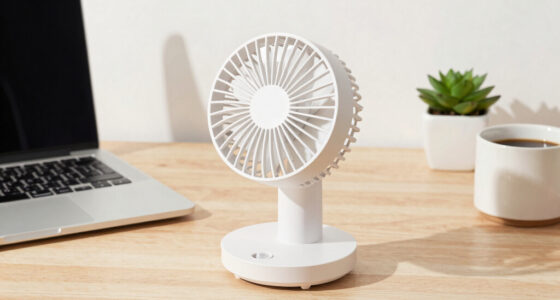
A good desk lamp, surge protector, under-bed storage, supportive pillow, earplugs, and fan usually improve daily life more than decorative clutter.
How can an uncomfortable dorm chair be improved?
Add lumbar support, adjust the sitting height if possible, support the feet, and use an external keyboard or mouse to create a more natural working position.
Design for your routine, then keep adjusting.
The best dorm setup is not fixed. Notice where clutter returns, when glare appears, and which activities compete for space. Small refinements can turn one compact room into a reliable base for both academic work and real rest.
Recover here
Create Clear Zones for Work and Rest — Your Brain Will Thank You
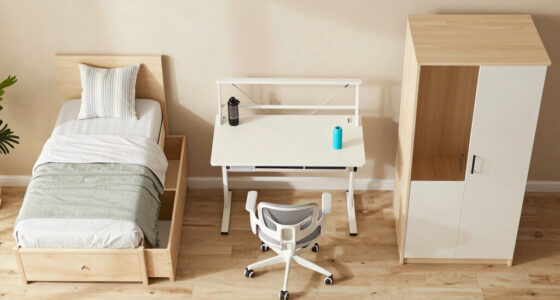
Setting up separate areas in your dorm for studying and sleeping helps your brain switch gears. When your brain associates specific spaces with certain activities, it becomes easier to focus during study time and relax during rest. For example, placing a colorful rug or a small shelf between your desk and bed creates a visual boundary that cues your brain to transition between work and relaxation. Using different wall colors, posters, or curtains further reinforces these zones. This visual segmentation reduces cognitive load, allowing you to concentrate better and unwind more effectively. Essentially, creating distinct zones minimizes the mental fatigue caused by constantly switching contexts, which is especially important in small spaces where boundaries are less obvious. The tradeoff is that you might need to dedicate some space to these visual cues, but the mental clarity gained is well worth it.
Think of your room like a mini city with neighborhoods. Study in one, rest in another. This mental cue boosts productivity and improves sleep quality, because your brain learns to associate each space with a specific activity.
Popular right now

Shark Navigator Lift-Away Upright Vacuum, NV360

KitchenAid Classic Series 4.5-Quart Tilt-Head Stand Mixer, Onyx Black

Dyson Ball Animal 3 Upright Vacuum
As an affiliate, we earn on qualifying purchases.
Position Your Desk Near Natural Light — Boost Your Focus
The best spot for your desk? Near a window that lets in plenty of daylight. Natural light helps you stay alert and sharp throughout the day. It also has a positive effect on your mood and circadian rhythms, which regulate sleep cycles. However, glare from direct sunlight can cause eye strain and make screens hard to see, so positioning is key. Face your desk so that the window is on your side or behind your monitor, ensuring sunlight illuminates your space without creating glare. This setup maximizes the benefits of natural light while minimizing discomfort. Keep supplies within arm’s reach to maintain focus and efficiency. A cluttered or poorly lit workspace can increase stress and make starting work seem more daunting. Conversely, a well-lit, organized desk encourages a proactive attitude toward studying, reducing procrastination and fatigue. The tradeoff involves balancing natural light with potential glare—sometimes a sheer curtain or adjustable blinds are necessary to fine-tune the lighting environment for optimal focus.
Positioning your desk near natural light isn’t just about visibility; it’s about creating an environment that naturally supports alertness and mental clarity, which are crucial for academic success.
Set Up Your Desk Ergonomically — Prevent Back and Neck Pain
Comfortable posture isn’t a luxury — it’s a necessity for maintaining focus and preventing long-term health issues. When your workspace is ergonomically sound, you reduce strain on your neck, back, and wrists, which can otherwise lead to discomfort and distraction. Adjust your laptop or monitor so the top of the screen is at eye level, which prevents neck strain from looking down or up. Using a stand or stacking books can help achieve this. Keep your elbows close to your sides and bent at about 90 degrees to reduce shoulder tension. Supporting your feet with a small stool or footrest promotes good circulation and maintains proper posture. Incorporating an external keyboard and mouse allows you to position your hands comfortably and avoid awkward wrist angles. Even small adjustments, like a rolled towel behind your lower back, can significantly improve support. These ergonomic choices matter because they directly impact your ability to focus during prolonged study sessions. Without proper setup, discomfort can cause frequent breaks and reduce overall productivity. The tradeoff might be investing in some accessories, but the payoff is a more comfortable, sustainable study environment that minimizes fatigue and injury risk.
In essence, ergonomic setup isn’t just about comfort—it’s about creating a foundation for sustained focus and physical well-being that supports your academic goals.
Frequently Asked Questions
How can I make a very small dorm room feel larger?
Use light colors on walls and furniture, keep pathways clear, and maximize vertical storage. Mirrors can add a sense of depth, and under-bed bins keep clutter out of sight. All these tricks make the room feel more open and inviting.
Where should I put my desk?
Near a window for natural light is ideal, but face the screen away from direct sunlight to avoid glare. Place it where you have enough space to work comfortably without blocking pathways or your bed.
Is it bad to study in bed?
It’s not ideal for demanding work because it blurs the lines between rest and productivity. Use your desk for studying, and reserve your bed for sleep and relaxation to maintain healthy boundaries.
What are the most useful dorm-room purchases?
A good desk lamp, surge protector, under-bed storage, supportive pillow, earplugs, and a fan usually bring the most value. Focus on essentials that support your routine, not decorative clutter.
How can I improve an uncomfortable dorm chair?
Add lumbar support with cushions, adjust the height if possible, and use a footrest. External keyboards or supports can also help, making long sitting periods more bearable.
Conclusion
Small changes in how you arrange, light, and organize your dorm can turn it into a space that energizes you for work and soothes you for rest. Your environment shapes your habits more than you think—making it work for you is worth the effort.
Remember, the best setup is the one that adapts to your routines. Keep experimenting, and soon your dorm will feel like a true home base — a place where productivity and relaxation coexist effortlessly.