TL;DR
Effective cable management on dorm desks reduces clutter, improves safety, and boosts focus. Using simple tools like clips, sleeves, and wireless tech keeps your space clean and functional.
Picture this: a cluttered dorm desk with tangled cords snaking across your workspace, jostling your laptop, phone, and charger. It’s distracting, unsafe, and makes everything harder to find. The good news? A few simple tricks can turn chaos into calm.
In this guide, you’ll learn practical, real-world tips for managing cables in tight dorm spaces. Whether you’re battling a small desk or limited storage, these strategies will help you keep your tech organized, safe, and looking sharp.
Use Velcro straps and cable clips to keep cords neat and accessible.
Switch to wireless tech to drastically reduce cable clutter.
Create a routine to tidy cables weekly and prevent tangles.
Avoid over-tightening ties and overloading power strips for safety.
Get creative with DIY hacks to personalize your cable management.
Top Cable Management Tips for Dorm Desks
Turn a cramped workspace from cable chaos into a safer, calmer study zone. A few reusable straps, carefully placed clips and smart wireless swaps can clear the surface without sacrificing quick access to your tech.
Potential productivity loss associated with a disorganized workspace.
Reduction in visible cable volume when cords are bundled or sleeved.
Keep daily cables accessible while moving power strips and excess length off the desktop.
Report cable clutter as a common dorm-room issue.
A short routine prevents small tangles from becoming a full rewire.
Desktop, back edge and under-desk power zone.
Secure cables without pinching, crushing or sharply bending them.
A clear desk protects more than your aesthetic.
Loose cords get pulled, crushed and tangled. In a small dorm, that creates trip hazards, strains device ports and adds visual noise exactly where you need to concentrate.
Keep paths clear
Lift power strips and excess cord off the floor to reduce foot traffic, accidental pulls and electrical risk.
Reduce cable strain
Gentle routing prevents sharp bends and constant tension at connectors, helping cords and device ports last longer.
Lower visual noise
A clean work surface makes essentials easier to find and creates a calmer environment for study sessions.
Small fixes create visible gains.
Bundle long runs, move the power hub below the desk and replace only the wired devices that genuinely benefit from going wireless.
Five low-effort hacks for a tighter setup.
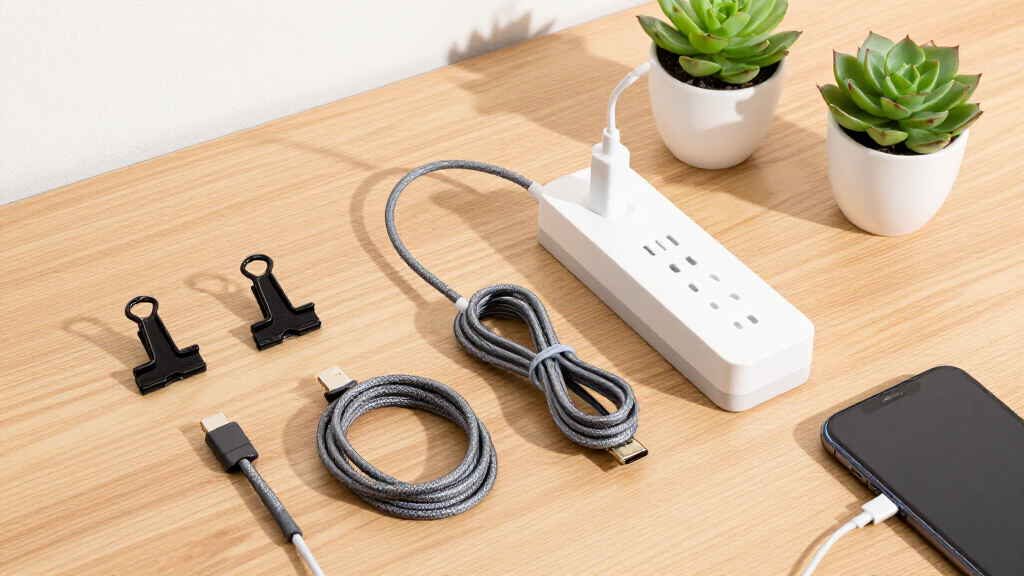
Use a layered system: secure individual cords, bundle related runs, then conceal power hardware and excess length beneath or behind the desk.
Velcro straps
Coil excess cable in loose loops and secure it gently. Reusable straps make future desk changes painless.
Adhesive clips
Guide frequently used charging cords along the rear or side edge so they stay accessible without crossing the work surface.
Cable sleeves
Combine related power, charging or data cables into one cleaner run while protecting them from abrasion.
Under-desk tray
Move the power strip, adapters and bulky excess cord below the desktop. Label both ends before hiding the bundle.
Binder clips
Use inexpensive clips as adjustable edge guides. Feed cables through the metal handles and reposition them whenever your setup changes.
Build a system you can maintain.
Organize around how you actually study. Daily chargers should remain reachable; rarely used cables can be labeled, coiled and stored away.
Assess
Unplug everything and separate daily essentials from occasional accessories.
Group
Sort charging, power and data cables into distinct bundles.
Route
Choose paths along the rear edge and away from knees, drawers and chair wheels.
Secure
Add straps, clips and sleeves without over-tightening or sharply bending cords.
Reset
Spend five minutes each week correcting loose clips, tangles and abandoned chargers.
Clip power cords along the desk back, bundle extra length with Velcro, then place the power strip and bulky adapters in an under-desk tray.
Match the tool to the cable problem.
No single product solves every setup. Choose adjustable tools for changing layouts and concealed storage for components that rarely move.
| Tool | What it does | Best for | Flexibility | Install effort |
|---|---|---|---|---|
| Velcro straps | Bundles excess length without damaging cable jackets. | Multiple cords and changing setups | High | Very low |
| Adhesive clips | Guides individual cables along a fixed surface or edge. | Chargers that fall behind the desk | Medium | Low |
| Cable sleeves | Turns several visible cords into one protected run. | Monitor, laptop and power bundles | Medium | Low |
| Under-desk tray | Holds power strips, adapters and excess cord off the floor. | Permanent power-zone cleanup | High | Medium |
| Binder clips | Creates temporary cable guides along a desk edge. | Budget routing and quick changes | High | Very low |
Best starter kit: reusable Velcro straps, four adhesive clips and one under-desk tray provide the strongest balance of access, flexibility and concealment.
Cut cables selectively—and customize the rest.
Wireless accessories can simplify high-traffic areas, while low-cost DIY fixes make the remaining cords easier to identify and fit into your room’s style.
Remove the right cables
Prioritize cables that constantly move, tangle or fall. Keep reliable wired power where it offers a clear practical advantage.
Make order inexpensive
Repurpose household items before buying a specialized system. The best solution is the one you can adjust and maintain.
Neat should also mean safe.
A tidy-looking setup can still be risky if cords are pinched, power strips are overloaded or heat-producing adapters are sealed inside an unventilated container.
Why Proper Cable Management Matters on Your Dorm Desk
Proper cable management isn’t just about looks. It’s about safety, device longevity, and mental clarity. When cords are tangled or scattered, they pose tripping hazards, especially in small spaces where movement is restricted. Damaged cables can lead to malfunctioning devices or even electrical hazards, which in a dorm setting can be particularly risky. Additionally, cluttered cables can cause unnecessary stress, making it harder to focus or find what you need quickly. Over time, tangled cords can also cause wear and tear on your devices’ ports and cables, leading to costly replacements. Therefore, investing time in managing cables effectively helps prevent accidents, extends the lifespan of your electronics, and creates a calmer, more efficient environment. The tradeoff is minimal effort for significant safety and productivity gains, making it a smart habit for any student.
As an affiliate, we earn on qualifying purchases.
Quick Fixes: 5 Easy Cable Organization Hacks for Dorm Rooms
- Use Velcro straps: Wrap excess cable length with Velcro straps to keep cords tidy and prevent tangling. This simple step makes your desk look cleaner and reduces accidental pulls that can damage cords. To do this effectively, measure the length of your excess cable, then secure it with a Velcro strap, avoiding tightness that could stress the cable.
- Adhesive cable clips: Attach these along your desk edge or behind your monitor to guide cables along designated paths. Position clips where cords naturally fall to prevent slipping or tangling. For best results, avoid placing clips where they might pinch or bend cables sharply, which can cause damage over time.
- Cable sleeves: Gather multiple cords into a single sleeve to reduce visual clutter and protect against abrasion. Before installing, group cords by function (charging, data, power), then slide them into a sleeve. Be mindful that thick sleeves can make quick unplugging difficult; choose a size that balances protection with accessibility.
- Under-desk trays: Mount a small tray underneath your desk to hold power strips and excess cords. This keeps cords off the floor, reducing tripping hazards and protecting them from foot traffic. To maximize efficiency, organize cords by priority and label them if needed, so you can easily find and unplug specific devices when necessary.
- Binder clips: Clip cables along the edge of your desk to route and secure them out of the way. Use different sizes for different cords, and position clips where cords won’t be pinched or bent sharply. Regularly check and adjust clips to maintain a tidy setup as your device arrangement changes.
For example, bundle your charging cords with Velcro straps, clip the bundle along the back of your desk, and hide excess length inside a sleeve. This approach ensures quick access when needed, keeps your surface clear, and prevents damage from accidental pulls.
As an affiliate, we earn on qualifying purchases.
The Best Tools for Dorm Cable Management (And How to Use Them)
| Tool | Description | Best For |
|---|---|---|
| Velcro straps | Reusable, adjustable straps that secure cables without damage. They help bundle cords neatly and can be repositioned as your setup changes. | Bundling multiple cords, adjusting as needed |
| Adhesive cable clips | Stick-on clips that hold cables along surfaces, guiding cords along designated routes and preventing accidental pulls. | Routing cables along desk edges or behind furniture |
| Cable sleeves | Flexible fabric or silicone tubes that encase several cords, reducing clutter and protecting cords from abrasion. | Hiding multiple cords in tight spaces |
| Under-desk trays | Mountable trays that hold power strips and excess cords underneath your desk, keeping them organized and off the floor. | Keeping cords off the ground and organized |
| Binder clips | Clips that secure cables along edges, allowing quick adjustments and routing. | Temporary or adjustable routing solutions |
Combining these tools allows you to create a flexible, organized setup. For example, clip power cords along the back of your desk, bundle extra length with Velcro straps, and hide clutter inside sleeves or trays. This layered approach prevents tangles, reduces wear, and makes your workspace adaptable to changing needs.
wireless charging station for dorm
As an affiliate, we earn on qualifying purchases.
As an affiliate, we earn on qualifying purchases.
Wireless Tech: How to Cut Cables and Still Stay Connected
Switching to wireless technology can drastically reduce cable clutter and make your dorm setup more streamlined. Start by replacing wired chargers with wireless charging pads for your phone, which eliminate the need for charging cables that often tangle or fall off your desk. Use Bluetooth speakers and earbuds to avoid auxiliary cords, freeing up space and reducing clutter. Upgrade your internet with Wi-Fi 6/6E routers, which provide fast, reliable wireless connections without extra cables. To implement this, identify devices that support wireless features, then invest in compatible accessories. The key is to plan your setup around these wireless options, which can be more cost-effective over time by reducing the need for cable replacements and repairs. Adopting wireless tech encourages a minimalist, efficient workspace, helping you stay organized and focused.
As an affiliate, we earn on qualifying purchases.
DIY and Creative Hacks to Tame Your Cables
Get creative with DIY solutions that are budget-friendly and personalized. For example, use washi tape to decorate and conceal cords along the back of your monitor, which not only hides unsightly cables but also adds a personal touch. Repurpose household items like small cardboard boxes or plastic containers as custom cable tidies—cut holes to feed cords through, keeping them organized and preventing tangling. Color-code your cables with rubber bands or washi tape for quick identification during busy study sessions. For added flair, arrange decorative clips or washi tape in patterns that match your room’s aesthetic. These hacks not only improve functionality but also make cable management a fun, creative activity. By customizing your setup, you develop a routine that encourages mindfulness about organization, making your space uniquely yours while maintaining order.
How to Keep Your Cables Tidy Every Day (Step-by-Step)
- Assess your cables: Identify which cords are essential daily and which can be stored away or unplugged when not in use. This reduces clutter and minimizes wear on unused cords.
- Group similar cords: Bundle chargers, power cords, and data cables separately using Velcro straps or clips. Grouping makes it easier to find what you need quickly and prevents tangling.
- Select your tools: Choose organizational tools based on your setup—Velcro straps for flexibility, clips for routing, or sleeves for bulkier cords. Using the right tools ensures your cables stay secure and accessible.
- Route cables intentionally: Attach clips along the back or underside of your desk to keep cords out of sight and prevent accidental pulls. Secure excess length with straps or inside sleeves to avoid clutter and strain.
- Maintain regularly: Dedicate a few minutes weekly to review your setup. Re-secure loose ties, replace worn straps, and reorganize as needed. Consistent upkeep prevents buildup of clutter and prolongs cable life.
Implementing this routine creates a sustainable habit that keeps your workspace safe, functional, and stress-free. Regular checks prevent damage and make troubleshooting easier, saving you time and money over time.
Common Pitfalls and How to Avoid Them
Neglecting proper cable management can lead to safety hazards and equipment damage. Over-tightening straps or clips can stress or damage cables, especially near bends or hot spots. Installing clips in locations where cords are sharply bent can cause internal damage over time. Ignoring heat buildup from devices or cords placed near vents or hot surfaces accelerates deterioration and risks overheating. Overloading power strips exceeds their capacity, increasing fire risk and damaging devices. To avoid these issues, regularly inspect your setup for signs of wear, replace worn or damaged ties, and follow electrical safety guidelines. Use appropriate mounting points and avoid excessive tension. Taking these precautions ensures your workspace remains safe, reliable, and long-lasting.
Frequently Asked Questions
How can I organize multiple cables on a small dorm desk?
Use small cable clips along the edge or back of your desk, bundle cords with Velcro straps, and hide excess length inside sleeves or under-desk trays. It’s all about routing cords where they’re out of sight but still accessible.
What are the best tools for cable management in a dorm room?
Velcro straps, adhesive cable clips, cable sleeves, and under-desk trays are all great options. They’re reusable, adjustable, and don’t damage surfaces or cords—perfect for dorm life.
How do I prevent cables from tangling or falling off the desk?
Secure cables along the edges or behind furniture using clips or ties. Keep cords short or bundle excess length. Regularly check and adjust your setup to avoid tangles and accidental pulls.
Are there wireless alternatives to reduce cable clutter?
Yes, wireless chargers, Bluetooth speakers, and Wi-Fi 6/6E internet devices can cut down the number of cords needed. These tech upgrades help keep your desk clean and efficient.
What DIY hacks work best for cable management?
Using washi tape to hide cords, rubber bands for color coding, or decorative clips can turn cable management into a fun project. These low-cost ideas make your space look intentional and tidy.
Conclusion
Your dorm desk is a tiny universe of tech—keep it tidy, and you’ll feel calmer, safer, and more in control. Simple tools and smart habits make all the difference in turning chaos into calm.
Imagine a desk where every cord has its place—no tangles, no hazards, just focus and clarity. That’s not just wishful thinking. It’s doable with a few quick steps. Start today and see your space transform.