

The best e-readers balance a comfortable screen, practical features, and a book library that suits how you read. My best overall pick is the Amazon Kindle Paperwhite (12th Generation, 2024), a focused reading choice that keeps the experience simpler than a large note-taking tablet. For color books and an open reading ecosystem, the Kobo Libra Colour stands out; for handwriting and document work, the Kindle Scribe offers a much larger writing surface. The main tradeoffs are color versus sharper monochrome text, compact size versus page space, and reading simplicity versus writing features. Read on for the full comparison and recommendations by reader type.

Prime made for students and young adults
- Fast, free delivery for dorm and study essentials
- Prime Video and Amazon Music included
- Member-only deals
Key Takeaways
- The Paperwhite models are the strongest all-purpose reading choices. They focus on books rather than notebooks, while the Scribe models add a much larger screen and writing tools for readers who need them.
- Color is most useful for illustrated content, not every book. The Kobo Clara Colour and Libra Colour add color in compact formats, while color Scribe models pair it with a larger reading and writing canvas.
- Kobo and Kindle suit different library habits. A device’s file support and connection to its bookstore can matter more over time than a small difference in screen size.
- Several listings represent overlapping versions or finishes. The two Paperwhite Signature Edition entries and two Clara Colour entries call for checking the exact generation, color, and included features before purchase.
- The 3.68-inch Pazzer Pocket reader is a niche portability pick. Its tiny screen is a meaningful compromise for long reading sessions compared with the 6-inch Kindle and Clara models.
| Amazon Kindle Scribe 32GB (newest model) |  | Best E-Reader for Reading and Handwritten Notes | Display: 11-inch Paperwhite display, 300 ppi, 16-level grayscale, built-in light | Storage: 32GB total; 23GB available to user | Dimensions: 7.4 × 9.6 × 0.21 inches | VIEW LATEST PRICE | See Our Full Breakdown |
| Amazon Kindle Paperwhite Signature Edition (32GB, Graphite) |  | Best Premium Compact Kindle | Display: 7-inch high-contrast display | Storage: 32GB | Material: Aluminum | VIEW LATEST PRICE | See Our Full Breakdown |
| Amazon Kindle Colorsoft 16 GB (1st Generation) |  | Best Color E-Reader for Everyday Books | Display: 7-inch Colorsoft; 300 ppi black and white, 150 ppi color | Storage: 16GB | Dimensions: 5 × 7 × 0.3 inches | VIEW LATEST PRICE | See Our Full Breakdown |
| Amazon Kindle Scribe Colorsoft 64GB (newest model) |  | Best Large-Screen Color E-Reader for Notes | Display: 11-inch Colorsoft; 300 ppi black and white, 150 ppi color, built-in light | Storage: 64GB total; 50GB available to user | Dimensions: 7.4 × 9.6 × 0.21 inches | VIEW LATEST PRICE | See Our Full Breakdown |
| Amazon Kindle Paperwhite Signature Edition (2024), 32 GB, Metallic Black |  | Best Value Premium Paperwhite | Display: 7-inch Paperwhite, 300 ppi, 16-level grayscale | Storage: 32GB | Dimensions: 5 × 7 × 0.3 inches | VIEW LATEST PRICE | See Our Full Breakdown |
| Amazon Kindle Colorsoft (2024), 16 GB, Color Display, Adjustable Warm Light, Ad-Free, Black (International Version) |  | Best Color Kindle for Everyday Reading | Display: 7-inch Colorsoft display | Resolution: 300 ppi black and white; 150 ppi color | Storage: 16 GB | VIEW LATEST PRICE | See Our Full Breakdown |
| Pazzer Pocket E-Ink eBook Reader, 3.68-Inch |  | Best Ultra-Compact E-Reader | Display: 3.68-inch E-Ink | Resolution: 259 PPI | Storage: 128 MB | VIEW LATEST PRICE | See Our Full Breakdown |
| Amazon Kindle 16GB (Newest Model) – 6″ Display, Graphite |  | Best Simple Kindle for Text-First Reading | Display size: 6 inches | Storage: 16 GB | Color: Graphite | VIEW LATEST PRICE | See Our Full Breakdown |
| Amazon Kindle Colorsoft Signature Edition 32GB |  | Best Premium Color E-Reader | Display: 7-inch paper-like, glare-free color display | Storage: 32 GB | Material and color: Aluminum; Graphite | VIEW LATEST PRICE | See Our Full Breakdown |
| Kobo Clara Colour 6-Inch Waterproof Colour eReader, 16GB, Black |  | Best Compact Color E-Reader | Display technology: E Ink Kaleido 3 | Screen size: 6 inches | Native resolution: 1024 × 768 | VIEW LATEST PRICE | See Our Full Breakdown |
| Kobo Elipsa 2E 10.3-Inch eReader with Kobo Stylus 2, 32GB |  | Best for Reading and Handwritten Notes | Display: 10.3-inch E Ink Carta 1200 touchscreen | Resolution: 1872 x 1404 | Lighting: ComfortLight PRO with adjustable brightness and color temperature | VIEW LATEST PRICE | See Our Full Breakdown |
| Amazon Kindle Paperwhite (12th Generation, 2024), 16 GB, Raspberry | 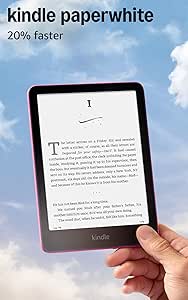 | Best Waterproof E-Reader for Everyday Reading | Display: 7-inch Paperwhite, 300 ppi, 16-level grayscale | Storage: 16 GB | Lighting: Adjustable white-to-amber lighting | VIEW LATEST PRICE | See Our Full Breakdown |
| Kobo Libra Colour eReader, 7″ Color E Ink, Waterproof, White |  | Best for Color E-Books and Page-Turn Buttons | Display: 7-inch E Ink Kaleido 3 | Resolution: 1680 x 1264 | Storage: 32 GB | VIEW LATEST PRICE | See Our Full Breakdown |
| Amazon Kindle (2024, 11th Generation), 16 GB, 6-Inch Display, Matcha |  | Best Compact E-Reader | Display: 6-inch glare-free display, 300 ppi, 16-level grayscale | Storage: 16 GB | Dimensions: 6.2 x 4.3 x 0.32 inches | VIEW LATEST PRICE | See Our Full Breakdown |
| Kobo Clara Colour 6-Inch Waterproof Colour E-Reader, 16GB, White |  | Best Compact Color E-Reader | Display: 6-inch E Ink Kaleido 3 colour display | Resolution: 1072 x 1448 | Storage: 16 GB | VIEW LATEST PRICE | See Our Full Breakdown |
| e-reader | Storage | Battery life | Display | Connectivity |
|---|---|---|---|---|
| Amazon Kindle Scribe 32GB | 32GB total; 23GB available to user | Up to 12 weeks reading or up to 3 weeks writing under stated conditions | 11-inch Paperwhite display, 300 ppi, 16-level grayscale, built-in light | Dual-band Wi-Fi |
| Amazon Kindle Paperwhite Signa | 32GB | Up to 12 weeks | 7-inch high-contrast display | — |
| Amazon Kindle Colorsoft 16 GB | 16GB | Up to 8 weeks under stated conditions | 7-inch Colorsoft; 300 ppi black and white, 150 ppi color | Dual-band Wi-Fi and Bluetooth audio |
| Amazon Kindle Scribe Colorsoft | 64GB total; 50GB available to user | Up to 8 weeks reading or up to 2 weeks writing under stated conditions | 11-inch Colorsoft; 300 ppi black and white, 150 ppi color, built-in light | Dual-band Wi-Fi |
| Amazon Kindle Paperwhite Signa | 32GB | Up to 12 weeks under specified usage conditions | 7-inch Paperwhite, 300 ppi, 16-level grayscale | Dual-band Wi-Fi and Bluetooth audio |
| Amazon Kindle Colorsoft | 16 GB | Up to 8 weeks under specified usage conditions | 7-inch Colorsoft display | Dual-band 2.4 GHz and 5 GHz Wi-Fi; Bluetooth audio |
| Pazzer Pocket E-Ink eBook Read | 128 MB | Up to 4 weeks | 3.68-inch E-Ink | Wi-Fi |
| Amazon Kindle 16GB | 16 GB | Up to 6 weeks | — | — |
| Amazon Kindle Colorsoft Signat | 32 GB | Up to 8 weeks | 7-inch paper-like, glare-free color display | — |
| Kobo Clara Colour 6-Inch Water | 16 GB | Up to 2 weeks | — | Wi-Fi |
| Kobo Elipsa 2E 10.3-Inch eRead | 32 GB | — | 10.3-inch E Ink Carta 1200 touchscreen | Wi-Fi, Bluetooth |
| Amazon Kindle Paperwhite | 16 GB | Up to 12 weeks under specified usage conditions | 7-inch Paperwhite, 300 ppi, 16-level grayscale | 2.4 GHz and 5.0 GHz Wi-Fi; Bluetooth audio |
| Kobo Libra Colour eReader | 32 GB | 4 weeks | 7-inch E Ink Kaleido 3 | Wi-Fi, Bluetooth |
| Amazon Kindle | 16 GB | Up to 6 weeks under specified usage conditions | 6-inch glare-free display, 300 ppi, 16-level grayscale | Dual-band 2.4 GHz and 5.0 GHz Wi-Fi |
| Kobo Clara Colour 6-Inch Water | 16 GB | Up to 2 weeks | 6-inch E Ink Kaleido 3 colour display | Wi-Fi |
More Details on Our Top Picks
Amazon Kindle Scribe 32GB (newest model)
The Kindle Scribe is the strongest fit here for readers who want a large e-reader that can also replace a paper notebook. Its 11-inch, 300 ppi glare-free screen gives novels and documents more room than the 7-inch Kindle Paperwhite Signature Edition, while the included pen supports handwritten notes in books, notebooks, and imported documents. Handwriting tools and cloud-service support make it more useful for study or document review than a conventional Kindle. The tradeoff is size: at 400g, it is much less pocketable than the Paperwhite, and its monochrome screen cannot show color illustrations or highlights. I’d choose this over the Colorsoft Scribe if crisp black-and-white reading and longer stated battery life matter more than color. It makes less sense if you mainly want a light, simple book reader.
Pros:- Large 11-inch, 300 ppi glare-free screen suits books, PDFs, and documents
- Included pen supports handwriting without charging and has an eraser and shortcut button
- Notebook tools can search, summarize, and convert handwriting to text
- Long stated battery life of up to 12 weeks for reading
Cons:- At 400g, it is substantially heavier and less portable than the 7-inch Paperwhite models
- Monochrome display cannot show color content or color-coded notes
- Writing use has a shorter stated battery life than reading use
Best for: Readers, students, and document reviewers who want a large e-reader with a pen for notes and markups
Not ideal for: Commuters seeking a pocketable device or readers who need color for comics, charts, or illustrated books
- Display:11-inch Paperwhite display, 300 ppi, 16-level grayscale, built-in light
- Storage:32GB total; 23GB available to user
- Dimensions:7.4 × 9.6 × 0.21 inches
- Weight:400g (14.1 oz), excluding pen
- Battery life:Up to 12 weeks reading or up to 3 weeks writing under stated conditions
- Connectivity:Dual-band Wi-Fi
- Supported formats:AZW3, AZW, TXT, PDF, unprotected MOBI, PRC; additional formats through conversion
- Included:Kindle Scribe, Premium Pen, USB-C cable, replacement tips
Our verdict“Choose the Kindle Scribe if you want a roomy, monochrome Kindle that doubles as a capable digital notebook.”
Amazon Kindle Paperwhite Signature Edition (32GB, Graphite)
This Paperwhite Signature Edition is the pick for readers who want a refined, straightforward e-reader rather than a writing tablet. Its 7-inch high-contrast display, auto-adjusting front light, and warm-light controls keep the reading experience comfortable without the bulk of the Kindle Scribe. The aluminum design and IPX8 waterproofing make it a polished companion for travel or reading near water; the Scribe offers far more room for notes, but is much heavier. Compared with the 2024 Paperwhite Signature Edition in this roundup, this listing highlights a thinner aluminum build and replaceable battery, though both offer 32GB storage and long stated battery life. The main compromise is limited versatility: there is no pen or color display, and audiobook listening requires an external Bluetooth device. Protective covers are also not included.
Pros:- Compact 7-inch high-contrast display with auto-adjusting and adjustable warm front light
- IPX8 waterproofing suits reading around water
- Aluminum construction is thin and durable
- Replaceable battery is designed to extend the device’s usable life
Cons:- No pen or large-format screen for handwritten notes and document markup
- Audiobooks require an external Bluetooth device
- Protective covers and other accessories are sold separately
Best for: Frequent readers who want a durable, premium-feeling 7-inch Kindle for travel, baths, or poolside reading
Not ideal for: Readers who annotate extensively, need a large screen for PDFs, or want color or built-in audio
- Display:7-inch high-contrast display
- Storage:32GB
- Material:Aluminum
- Battery life:Up to 12 weeks
- Water resistance:IPX8
- Lighting:Auto-adjusting front light and adjustable warm light
- Additional features:Double-tap page turns; replaceable battery
- Color:Graphite
Our verdict“Pick this Paperwhite if a compact, waterproof, premium-built Kindle matters more to you than note-taking or color.”
Amazon Kindle Colorsoft 16 GB (1st Generation)
The Kindle Colorsoft brings color to the familiar 7-inch Kindle format, making it a better match than the black-and-white Paperwhite for readers who use colored highlights or read illustrated titles. Its waterproof design, adjustable lighting, and dark mode keep it practical as an everyday reader rather than a device reserved for comics. The compromise is that color runs at 150 ppi, compared with 300 ppi for black-and-white content, so colored pages look less detailed than standard text. The 16GB capacity is also smaller than the 32GB in either Paperwhite Signature Edition, though it may be ample for a book-focused library. Unlike the Kindle Scribe Colorsoft, this model is lighter and easier to carry, but it has no large writing surface or included pen. Choose it for modest color needs, not color-rich workbooks or intensive markup.
Pros:- 7-inch color display supports five highlight colors
- 300 ppi black-and-white text remains suited to sharp everyday reading
- IPX8 waterproofing and adjustable warm lighting support varied reading settings
- Bluetooth audio and VoiceView accessibility are supported
Cons:- Color resolution is 150 ppi, lower than its black-and-white resolution
- The color filter layer can make the screen look different in texture or brightness from a Paperwhite
- 16GB is less storage than the 32GB Paperwhite Signature Edition models
Best for: Readers who want colored highlights and occasional color illustrations in a portable, waterproof Kindle
Not ideal for: Readers who need high-detail color images, extensive handwriting tools, or more storage for a large media library
- Display:7-inch Colorsoft; 300 ppi black and white, 150 ppi color
- Storage:16GB
- Dimensions:5 × 7 × 0.3 inches
- Weight:7.6 oz (215g)
- Battery life:Up to 8 weeks under stated conditions
- Charging:USB-C; fully charges in less than 2.5 hours with a 9W adapter
- Water resistance:IPX8
- Connectivity:Dual-band Wi-Fi and Bluetooth audio
Our verdict“Choose the Colorsoft if color highlights and illustrations matter more than the sharper monochrome screen of a Paperwhite.”
Amazon Kindle Scribe Colorsoft 64GB (newest model)
The Kindle Scribe Colorsoft combines the Scribe’s notebook-first design with a large color screen, making it the most capable choice in this group for annotating illustrated documents or organizing handwritten notes with color. Its 11-inch display gives PDFs and books more working space than the 7-inch Kindle Colorsoft, and the included pen supports writing in notebooks, documents, and books. The color layer adds useful visual distinctions, but it also means color content displays at 150 ppi, while black-and-white content reaches 300 ppi; the manufacturer also notes that screen texture or brightness can differ from the monochrome Scribe. Battery life is stated at up to eight weeks reading and two weeks writing, shorter than the monochrome Kindle Scribe. I’d choose the regular Scribe for text-focused reading and longer battery life, and this model when color markup is worth the tradeoff.
Pros:- Large 11-inch display provides room for color documents, books, and notes
- Included pen supports handwriting, document markups, and notebook use
- AI notebook tools can find information, summarize notes, and convert handwriting to text
- 64GB storage offers more capacity than the 16GB Kindle Colorsoft
Cons:- Color content is 150 ppi, compared with 300 ppi for black-and-white content
- Color filter layer can change perceived screen texture or brightness versus the monochrome Scribe
- At 400g, it is far less portable than the 7-inch Kindle Colorsoft, with shorter stated battery life than the monochrome Scribe
Best for: Readers, researchers, and students who annotate color PDFs or illustrated books and want a large e-reader with handwriting tools
Not ideal for: Readers who mostly read novels, want the longest stated battery life, or need a small, lightweight device
- Display:11-inch Colorsoft; 300 ppi black and white, 150 ppi color, built-in light
- Storage:64GB total; 50GB available to user
- Dimensions:7.4 × 9.6 × 0.21 inches
- Weight:400g (14.1 oz), excluding pen
- Battery life:Up to 8 weeks reading or up to 2 weeks writing under stated conditions
- Connectivity:Dual-band Wi-Fi
- Supported formats:AZW3, AZW, TXT, PDF, unprotected MOBI, PRC; additional formats through conversion
- Included:Kindle Scribe Colorsoft, Premium Pen, USB-C cable, replacement tips
Our verdict“Choose this Scribe if you need a large, pen-equipped Kindle for color documents and notes, and can accept lower color resolution and shorter battery life.”
Amazon Kindle Paperwhite Signature Edition (2024), 32 GB, Metallic Black
This 2024 Paperwhite Signature Edition is the balanced choice for readers who want the practical upgrades of a premium Kindle without stepping up to a large writing device. Its 7-inch, 300 ppi glare-free screen, auto-adjusting front light, and IPX8 water resistance cover the core needs of an everyday reader. Wireless charging support is a useful convenience, though the charging dock is sold separately; the newer Graphite Signature Edition listing also highlights an aluminum design and replaceable battery, details that are not listed for this 2024 model. Against the Kindle Colorsoft, this Paperwhite gives up color but keeps a sharper monochrome reading experience. Its 32GB capacity and up-to-12-week stated battery life suit a substantial book library, but streaming Audible over Bluetooth can reduce battery life. I’d favor this model for text-first reading and choose the Colorsoft only if colored content is a priority.
Pros:- 300 ppi glare-free display with auto-adjusting front light
- 32GB storage accommodates a substantial book library
- IPX8 water resistance supports reading near water
- USB-C and wireless charging support offer two charging options
Cons:- Wireless charging dock is sold separately
- No color display or pen-based note-taking features
- Audible streaming over Bluetooth can reduce battery life
Best for: Text-focused readers who want a waterproof 7-inch Kindle with generous storage, auto-adjusting light, and wireless charging support
Not ideal for: Readers who need color display, a pen for handwritten notes, or wireless charging without buying a separate dock
- Display:7-inch Paperwhite, 300 ppi, 16-level grayscale
- Storage:32GB
- Dimensions:5 × 7 × 0.3 inches
- Weight:7.5 oz (214g)
- Battery life:Up to 12 weeks under specified usage conditions
- Charging:USB-C; wireless charging supported
- Water resistance:IPX8; tested to withstand immersion in 2m of fresh water for 60 minutes
- Connectivity:Dual-band Wi-Fi and Bluetooth audio
Our verdict“Choose the 2024 Paperwhite Signature Edition if you want a sharp, waterproof Kindle for text-first reading and value wireless charging support.”
Amazon Kindle Colorsoft (2024), 16 GB, Color Display, Adjustable Warm Light, Ad-Free, Black (International Version)
The 7-inch color screen gives comics, illustrated books, and color highlights a place on a Kindle without giving up 300 ppi black-and-white text. Compared with the Amazon Kindle 16GB (Newest Model), it is the better fit for readers who want color and a larger display, while the standard Kindle is simpler and more compact for mostly text-based books. Adjustable white-to-amber lighting and IPX8 waterproofing make this a flexible choice for evening reading or by the pool. Its tradeoff is that color appears at 150 ppi, so illustrations are less detailed than monochrome text; it also costs you some battery life when Bluetooth audio is in use. Choose it for color convenience, not for the sharpest possible images or the lightest setup.
Pros:- 7-inch color display supports illustrated reading and five highlight colors.
- 300 ppi black-and-white resolution keeps ordinary text sharp.
- Adjustable white-to-amber lighting suits different rooms and times of day.
- IPX8 waterproofing and 16 GB storage support flexible everyday use.
Cons:- Color resolution is 150 ppi, so illustrations look less detailed than monochrome text.
- Bluetooth audiobook streaming reduces battery life.
- Does not connect to ad-hoc or peer-to-peer Wi-Fi networks.
Best for: Kindle readers who regularly read comics, illustrated books, or use color-coded highlights and want waterproofing.
Not ideal for: Readers who mainly want crisp black-and-white text, a smaller device, or long listening sessions over Bluetooth.
- Display:7-inch Colorsoft display
- Resolution:300 ppi black and white; 150 ppi color
- Storage:16 GB
- Battery life:Up to 8 weeks under specified usage conditions
- Connectivity:Dual-band 2.4 GHz and 5 GHz Wi-Fi; Bluetooth audio
- Water resistance:Waterproof
- Weight:7.6 oz (215 g)
- Charging:USB-C; fully charges in under 2.5 hours with a 9 W adapter
Our verdict“Choose this Kindle if color content and waterproof reading matter more than maximum image detail or the smallest form factor.”
Pazzer Pocket E-Ink eBook Reader, 3.68-Inch
The 69 g body and 3.68-inch screen make the Pazzer P4 unusually easy to carry when a phone-sized reading device matters more than a roomy page. Its 259 PPI E-Ink display, touchscreen, and physical buttons offer a more book-focused experience than reading on a phone, while app, USB, and TF-card transfers give it more ways to load files than the Amazon Kindle 16GB (Newest Model). That flexibility is appealing for readers with EPUB or TXT files, but the P4 is a niche pick: its 128 MB internal storage is far below the 16 GB offered by the Kindle, so a large library depends on external storage or frequent transfers. The tiny screen also means more page turns and less comfortable viewing for comics or large text. I’d choose it for portability, not as a primary reader for long sessions.
Pros:- At 69 g, it is easy to carry in a pocket or small bag.
- 259 PPI E-Ink display offers a glare-reducing alternative to phone reading.
- Touchscreen and physical buttons let readers choose how to turn pages.
- Books can be added by app, USB cable, or TF card.
Cons:- The 3.68-inch screen can feel cramped for extended reading and larger text.
- 128 MB of internal storage is limited compared with 16 GB Kindle options.
- Listed file support is limited to EPUB and TXT.
Best for: Commuters and travelers who want a very small, light device for short reading sessions and a modest collection of EPUB or TXT books.
Not ideal for: Readers who want a full-page reading experience, substantial built-in library storage, or a color screen for comics.
- Display:3.68-inch E-Ink
- Resolution:259 PPI
- Storage:128 MB
- Battery life:Up to 4 weeks
- Connectivity:Wi-Fi
- Supported formats:EPUB, TXT
- Controls:Touchscreen and buttons
- Dimensions and weight:3.93 × 2.5 × 0.2 inches; 69 g
Our verdict“Pick the Pazzer P4 for pocket-first portability and skip it if you want a comfortable, high-capacity main e-reader.”
Amazon Kindle 16GB (Newest Model) – 6″ Display, Graphite
This is the straightforward pick for readers who want an uncomplicated Kindle for novels, nonfiction, and other text-heavy books. The 6-inch display keeps the device compact, while adjustable brightness and a distraction-free interface make it easier to settle into reading than on a phone. Compared with the Amazon Kindle Colorsoft (2024), this model gives up color and the larger screen, but it is the more focused choice if most of your library is plain text. Its replaceable battery is a useful longevity advantage, though the listing does not provide a display resolution or charging details to compare. Page-turn remote support is available, but the remote and covers are separate purchases. I’d favor this Kindle for a simple, portable reading routine; readers who need color, waterproofing, or more screen space should look at other options here.
Pros:- Compact 6-inch display keeps the device easy to carry.
- Adjustable brightness supports reading in different lighting conditions.
- Replaceable battery offers a practical path to longer device life.
- Distraction-free interface avoids social media and notification interruptions.
Cons:- No color display for comics, illustrations, or color-coded highlights.
- Page-turn remote and covers are sold separately.
- Some software features, including Ask This Book, are not yet available.
Best for: Readers who primarily read text-based Kindle books and want a compact, distraction-free device with a replaceable battery.
Not ideal for: Comic and graphic-novel readers, shoppers seeking a color display, or anyone who wants included accessories such as a page-turn remote.
- Display size:6 inches
- Storage:16 GB
- Color:Graphite
- Battery life:Up to 6 weeks
- Battery type:Replaceable
- Reading experience:Distraction-free interface with no notifications or social media
- Brightness:Adjustable brightness
- Remote support:Wireless page-turn remote support; remote sold separately
Our verdict“Choose this model for compact, text-first Kindle reading and a replaceable battery, rather than color or extra screen space.”
Amazon Kindle Colorsoft Signature Edition 32GB
The Signature Edition is the lineup’s premium choice for readers who want color without stepping up to a large writing-focused tablet. Its 7-inch glare-free color display, 32 GB of storage, auto-adjusting front light, and waterproof construction make it more fully equipped than the 16 GB Amazon Kindle Colorsoft (2024). That extra capacity is useful for a bigger collection of illustrated books, while the aluminum design and replaceable battery speak to buyers who plan to keep a device for years. Both Colorsoft models offer a similar compact color-reading purpose, so the Signature Edition makes sense when its added storage and listed premium build matter to you—not simply because it is the more elaborate option. The tradeoffs are separately sold accessories and unavailable software features such as Ask This Book; the supplied data also does not give color resolution.
Pros:- 7-inch glare-free color display suits comics and illustrated books.
- 32 GB storage provides more room than the 16 GB Kindle Colorsoft.
- Auto-adjusting front light, adjustable warm light, and Dark Mode support varied reading conditions.
- Waterproof aluminum design and replaceable battery support long-term, flexible use.
Cons:- Magnetic cover and wireless remote are sold separately.
- Some software features, including Ask This Book, are not yet available.
- The provided specifications do not state the display resolution.
Best for: Readers with large collections of comics, graphic novels, and ebooks who want a waterproof 7-inch color Kindle with auto-adjusting lighting.
Not ideal for: Text-only readers who do not need 32 GB, or shoppers who prefer a more basic Kindle and want to avoid buying accessories separately.
- Display:7-inch paper-like, glare-free color display
- Storage:32 GB
- Material and color:Aluminum; Graphite
- Lighting:Auto-adjusting front light, adjustable warm light, Dark Mode
- Battery life:Up to 8 weeks
- Battery type:Replaceable
- Water resistance:Waterproof
- Ads:No ads
Our verdict“Choose the Signature Edition if you want a high-capacity, waterproof color Kindle with premium lighting and build features.”
Kobo Clara Colour 6-Inch Waterproof Colour eReader, 16GB, Black
The Kobo Clara Colour brings a color E Ink screen to a compact 6-inch body, making it the better choice for readers who want color but find the 7-inch Amazon Kindle Colorsoft (2024) too large. Its ComfortLight PRO, Dark Mode, and adjustable text settings give readers control over page appearance, while IPX8 protection allows reading near water. The 16 GB of storage suits a personal ebook library, and recycled and ocean-bound plastic adds a materials distinction not specified for the Kindle Colorsoft. The compromises are a listed battery life of up to two weeks—shorter than the Colorsoft’s up to eight weeks—and a 1024 × 768 native resolution that may show less detail than higher-resolution displays. I’d choose the Clara for compact color reading and adjustable comfort, not for the longest time between charges.
Pros:- 6-inch E Ink Kaleido 3 color display fits readers who want a smaller device.
- ComfortLight PRO, Dark Mode, and adjustable font and line spacing support personalized reading.
- IPX8 waterproof protection suits reading around water.
- Made with recycled and ocean-bound plastic.
Cons:- Listed battery life is up to two weeks, shorter than the Kindle Colorsoft models’ up to eight weeks.
- 1024 × 768 native resolution may show less detail than higher-resolution displays.
- The compact screen offers less room for comics and graphic novels than a 7-inch reader.
Best for: Readers who want color highlights and illustrated ebooks in a compact, waterproof device with adjustable lighting and text settings.
Not ideal for: Readers who prioritize long battery intervals, a larger screen for comics, or the highest available image detail.
- Display technology:E Ink Kaleido 3
- Screen size:6 inches
- Native resolution:1024 × 768
- Storage:16 GB
- Connectivity:Wi-Fi
- Battery life:Up to 2 weeks
- Weight:6.14 ounces
- Water resistance:IPX8; up to 60 minutes in up to 2 metres of water
Our verdict“Pick the Kobo Clara Colour for a small, waterproof color reader with flexible lighting, and choose a larger model if battery life or page size comes first.”
Kobo Elipsa 2E 10.3-Inch eReader with Kobo Stylus 2, 32GB
The Kobo Elipsa 2E is the standout choice here for readers who want an e-reader that can also handle serious annotation. Its 10.3-inch E Ink screen gives PDFs, book pages, and handwritten notes more room than the compact Kobo Libra Colour or Kindle Paperwhite, while the included rechargeable Stylus 2 avoids the separate-accessory purchase required for stylus use on the Libra Colour. Adjustable brightness and color temperature let you adapt the screen to different rooms and times of day. The tradeoff is portability: at 13.62 ounces, it is much less pocket-friendly than the 7-inch Paperwhite and 6-inch Kindle. Battery life also varies with use, so frequent writing may mean more charging. I’d pick it for desk, study, or work reading rather than casual travel.
Pros:- Large, glare-free 10.3-inch screen gives PDFs and notes more usable space
- Included rechargeable Stylus 2 supports annotations and notebook writing
- ComfortLight PRO adjusts brightness and color temperature
- 32GB storage and an exterior made partly from recycled and ocean-bound plastic
Cons:- Large body is less convenient to carry than the 6-inch Kindle or 7-inch Kobo Libra Colour
- Battery life varies with reading and writing habits
Best for: Students, researchers, and PDF-heavy readers who want a large screen and an included stylus for annotations and notebooks
Not ideal for: Commuters and readers who want a lightweight, pocketable device for novels; the 10.3-inch body is considerably larger than the Kindle Paperwhite
- Display:10.3-inch E Ink Carta 1200 touchscreen
- Resolution:1872 x 1404
- Lighting:ComfortLight PRO with adjustable brightness and color temperature
- Storage:32 GB
- Connectivity:Wi-Fi, Bluetooth
- Included accessory:Rechargeable Kobo Stylus 2
- Weight:13.62 ounces
- Dimensions:8.9 x 7.5 x 0.3 inches
- Supported format:PDF
Our verdict“Choose the Kobo Elipsa 2E if handwritten notes and large-format reading matter more to you than compact size.”
Amazon Kindle Paperwhite (12th Generation, 2024), 16 GB, Raspberry
The 2024 Kindle Paperwhite makes the most sense for readers who want a capable all-rounder without moving up to a larger or more specialized device. Its 7-inch, 300 ppi glare-free display is roomier than the 6-inch Kindle, and adjustable white-to-amber lighting gives more control over evening reading. Waterproofing adds reassurance by the pool or in the bath, while 16GB holds a substantial library. Compared with the Kobo Libra Colour, the Paperwhite sticks to grayscale, so it is less suited to comics and color highlights; in return, its screen is focused on conventional book reading. VoiceView and Dark Mode add accessibility options, though VoiceView spoken feedback is limited to English. I’d favor this model over the basic Kindle when water resistance and a larger screen matter more than minimum size.
Pros:- 7-inch, 300 ppi glare-free display with adjustable white-to-amber lighting
- Waterproof design suits reading near water
- 16GB storage for a large ebook collection
- USB-C charging and up to 12 weeks of battery life under specified conditions
Cons:- Grayscale screen cannot show comics and illustrations in color like the Kobo Libra Colour
- VoiceView spoken feedback is available in English only
- Audiobook streaming reduces battery life
Best for: Frequent readers who want a larger-than-basic Kindle screen, waterproof protection, and adjustable warm lighting for travel or bedside reading
Not ideal for: Readers who want color pages, physical page-turn buttons, or stylus-based annotation; the Kobo Libra Colour offers color and buttons
- Display:7-inch Paperwhite, 300 ppi, 16-level grayscale
- Storage:16 GB
- Lighting:Adjustable white-to-amber lighting
- Battery life:Up to 12 weeks under specified usage conditions
- Charging:USB-C; fully charges in less than 2.5 hours with a 9 W adapter
- Connectivity:2.4 GHz and 5.0 GHz Wi-Fi; Bluetooth audio
- Accessibility:VoiceView screen reader, Dark Mode, adjustable fonts and layout
- Weight:7.4 oz (211 g)
Our verdict“Choose the Paperwhite for comfortable, waterproof everyday reading, but pick the Kobo Libra Colour if color content is a priority.”
Kobo Libra Colour eReader, 7″ Color E Ink, Waterproof, White
The Kobo Libra Colour is the most versatile pick here for readers whose libraries include comics, illustrated books, or color-marked notes. Its 7-inch Kaleido 3 color display adds color without the glare of a conventional tablet, and the physical page-turn buttons make one-handed reading easier than on the touchscreen-only Kobo Clara Colour. It also supports stylus input, though the stylus is sold separately; the larger Kobo Elipsa 2E is a better fit if writing and PDF annotation are the main job because it includes a stylus and offers a much larger canvas. Color E Ink has lower brightness and contrast than a typical black-and-white e-reader, so plain-text readers may prefer the Kindle Paperwhite’s grayscale screen. Waterproofing and 32GB storage make this a flexible travel companion, but its special strengths matter most to color-content readers.
Pros:- 7-inch color E Ink display shows comics and illustrations without tablet-style glare
- IPX8 waterproof rating supports reading near water
- Physical page-turn buttons aid one-handed use
- 32GB storage, Wi-Fi, Bluetooth, and OverDrive library borrowing
Cons:- Color E Ink has lower brightness and contrast than standard black-and-white E Ink
- Stylus is sold separately for note-taking and highlighting
- Smaller screen is less suited to large PDFs than the Kobo Elipsa 2E
Best for: Readers of comics, graphic novels, and illustrated books who want color E Ink, waterproofing, and physical page-turn buttons
Not ideal for: Text-only readers seeking the brightest, highest-contrast black-and-white page, or writers who want an included stylus and a larger note-taking surface
- Display:7-inch E Ink Kaleido 3
- Resolution:1680 x 1264
- Storage:32 GB
- Connectivity:Wi-Fi, Bluetooth
- Battery life:4 weeks
- Weight:7.05 ounces
- Supported formats:BMP, CBR, CBZ, EPUB, EPUB3, FlePub, GIF, HTML, JPEG, MOBI, PDF, PNG, RTF, TIFF, TXT
- Warranty:1 Year Limited Warranty
Our verdict“Choose the Kobo Libra Colour if you want color reading and page-turn buttons in a waterproof, mid-size e-reader.”
Amazon Kindle (2024, 11th Generation), 16 GB, 6-Inch Display, Matcha
The 2024 Kindle is the most portable option in this group: its 5.56-ounce body and 6-inch screen are easy to slip into a small bag or hold for long stretches. The 300 ppi display keeps text crisp, and its adjustable front light and Dark Mode cover a range of reading conditions without adding much bulk. Compared with the 7-inch Kindle Paperwhite, it gives up a larger reading area, waterproofing, and adjustable warm lighting; what it gains is a smaller, lighter device for straightforward book reading. The 16GB capacity still leaves room for a broad ebook library. It is a focused, distraction-free reader rather than a color or annotation device, and the listed battery life is shorter than the Paperwhite’s. I’d choose it when carrying comfort matters more than extra features.
Pros:- Lightweight 5.56-ounce design is easy to carry and hold
- 6-inch glare-free display has 300 ppi resolution
- Adjustable front light and Dark Mode support different reading settings
- 16GB storage and USB-C charging
Cons:- No stated waterproof rating, unlike the Kindle Paperwhite and Kobo Libra Colour
- Smaller screen offers less room per page than the Paperwhite’s 7-inch display
- Up to six weeks of battery life under specified conditions is shorter than the Paperwhite’s stated maximum
Best for: Commuters, travelers, and readers with small bags who want a lightweight device for novels and other text-first books
Not ideal for: Readers who need waterproofing, a larger screen, or warm-light adjustment; the Kindle Paperwhite adds those features
- Display:6-inch glare-free display, 300 ppi, 16-level grayscale
- Storage:16 GB
- Dimensions:6.2 x 4.3 x 0.32 inches
- Weight:5.56 oz (158 g)
- Battery life:Up to 6 weeks under specified usage conditions
- Charging:USB-C; approximately 4 hours via computer USB or 2 hours with a 9 W adapter
- Connectivity:Dual-band 2.4 GHz and 5.0 GHz Wi-Fi
- Accessibility:VoiceView screen reader over Bluetooth audio, adjustable font and layout, black-and-white inversion
Our verdict“Pick the 2024 Kindle if portability and crisp text matter more than waterproofing or a larger display.”
Kobo Clara Colour 6-Inch Waterproof Colour E-Reader, 16GB, White
The Kobo Clara Colour brings color reading into a compact 6-inch format, making it a sensible choice for readers who want highlighted passages, illustrations, or occasional comics without carrying the larger Kobo Libra Colour. Its Kaleido 3 color screen and adjustable color highlighting offer a different experience from the monochrome Kindle, while ComfortLight PRO, Dark Mode, and IPX8 waterproofing make it adaptable for bedtime and reading near water. The smaller display is less comfortable for detailed graphic novels than the Libra Colour’s 7-inch screen, and the provided specs list Wi-Fi but not Bluetooth, unlike the Libra Colour. Its listed battery life is up to two weeks, shorter than the Kindle Paperwhite’s stated maximum. This is best for portable, color-capable reading, not for readers who want a large comic page or stylus note-taking.
Pros:- 6-inch Kaleido 3 color display supports color reading and highlights
- IPX8 waterproofing is rated for immersion up to 2 metres
- ComfortLight PRO, Dark Mode, and adjustable text settings
- 16GB storage for ebooks and audiobooks, with recycled and ocean-bound plastic in the materials
Cons:- 6-inch screen can feel cramped for comics and detailed illustrations
- Up to two weeks of stated battery life is shorter than the Kindle Paperwhite’s maximum
- Provided specs list Wi-Fi but not Bluetooth, unlike the Kobo Libra Colour
Best for: Readers who want a small waterproof e-reader for ebooks, color highlights, and occasional illustrated content, with OverDrive library access
Not ideal for: Graphic-novel fans who want larger pages, or readers seeking page-turn buttons, Bluetooth connectivity, or stylus annotation; the Kobo Libra Colour better matches those needs
- Display:6-inch E Ink Kaleido 3 colour display
- Resolution:1072 x 1448
- Storage:16 GB
- Connectivity:Wi-Fi
- Battery life:Up to 2 weeks
- Input:Touchscreen
- File formats:EPUB, GIF, JPEG, MOBI, PDF, PNG
- Special features:Adjustable blue light, Dark Mode, colour highlighting, audiobook support
- Materials:Recycled and ocean-bound plastic
Our verdict“Choose the Clara Colour for compact waterproof color reading, but step up to the Libra Colour for a larger screen and page-turn buttons.”

How We Picked
I ranked these best e-readers by how well each one serves a clear reading need, not by stacking features. The main criteria are screen comfort and size, portability, lighting and color options, storage, water resistance where listed, writing tools, and the ease of fitting the device into a reader’s existing book library. I also weigh how much a feature changes everyday use: a waterproof design may matter to a reader by the pool, while a stylus and large display matter more to someone annotating documents.
The order favors versatility for ordinary reading first, then rewards specialized strengths such as color, compactness, or handwriting when those features have a clear audience. Kindle and Kobo models are compared by their distinct ecosystem and feature choices rather than treated as interchangeable. Similar listings remain separate because generation, finish, storage, and edition details can vary; buyers should verify the exact version shown before choosing. The Pazzer’s very small screen places it below full-size readers for most people, even though its pocketable design serves a narrower purpose.
Factors to Consider When Choosing Best E-readers
Before choosing among these readers, I would start with the kind of material you actually read and the library you already own. A feature can sound appealing yet add little if you mostly read plain-text novels. These broader checks help prevent paying for a larger screen, color, or writing tools you will rarely use.
Match the Display to Your Books
For novels and other text-heavy reading, a monochrome screen is often the straightforward choice because color adds little to most pages. Color becomes more useful for comics, illustrated books, maps, and documents where colored details carry meaning. Do not treat a color screen as a blanket upgrade: check how your usual reading material looks on the screen type before paying for it. A larger display can also make charts and page layouts easier to view, but it takes away some portability. If you read mostly at home, that trade may be acceptable; commuters may prefer a smaller reader. Choose for the pages you read most, not for a rare use case.
Check the Bookstore and File Workflow
An e-reader is part of a reading system, not just a screen. Consider where you buy or borrow books, how you send personal documents to the device, and whether your current library can move with you. Switching ecosystems can add friction even when a new device has appealing hardware. Check supported formats and document tools for the specific model rather than assuming every file will transfer neatly. Readers with a large existing digital collection should investigate compatibility before replacing a device. If you are starting fresh, choose the store and library services you expect to use for years. That choice can matter more than a modest hardware difference.
Choose Size Around Reading Position
A compact reader is easier to carry and hold in one hand, while a larger screen shows more text or gives documents room to breathe. The tradeoff is not simply portability versus screen size: hand comfort, bag space, and how long you read in one sitting all matter. A very small device such as the Pazzer Pocket may suit brief sessions on the move, but its limited page area can mean more frequent page changes. A large Scribe or Elipsa makes more sense for annotations and documents than for readers who want a light, simple novel reader. Think about where you read most often and how you hold the device. If possible, compare the physical dimensions with a book you already find comfortable.
Pay for Writing Tools Only If You Will Use Them
A stylus and notebook features can turn an e-reader into a useful companion for meeting notes, markup, and document review. They also bring a larger body and a different kind of interface than a reader built around turning pages. If your notes already live in a phone or paper notebook, those extras may add complexity without replacing anything. Check what you need to annotate—books, PDFs, or personal documents—and whether the device supports that workflow. A large writing surface is particularly useful when you need room to mark up a page, but it is not automatically better for casual reading. Choose a note-taking model when writing is part of the plan, not just because a pen is included.
Treat Water Resistance and Lighting as Use-Case Features
Water resistance is most valuable when reading near a bath, pool, or other place where splashes are plausible; it may matter little for a device used only on a bedside table. Verify the exact model’s protection rather than assuming every product in a family has the same rating. Front lighting supports reading in dim rooms, while adjustable warmth can make the screen feel more comfortable to some readers at night. These features are about where and when you read, not a substitute for a screen that suits your books. If you read outdoors, also think about glare and how you will hold the device. Prioritize the conditions you actually encounter instead of treating every extra as a must-have.
Check the Exact Listing Before Choosing
This roundup includes close variants, including repeated Paperwhite Signature Edition and Clara Colour listings, plus international and generation-specific versions. Similar names do not guarantee identical software, included services, color, or hardware details. Read the listing’s model year, storage capacity, edition, and region carefully before placing an order. This is especially useful when a family has both standard and Signature versions or several finishes. Make a short checklist of the features you need, then compare it with the exact listing rather than relying on the family name. That simple check helps avoid buying a familiar-sounding version that lacks a feature you expected.
Frequently Asked Questions
Should I choose a Kindle or a Kobo if I already own e-books?
Start by identifying where your books came from and which formats they use. Books tied to a particular store may not transfer directly to another ecosystem, while personal files can have different format and document-handling requirements. Check the exact device’s supported formats and the process for moving your library before switching. If most of your collection is already in one store, staying within that system may be the least troublesome choice. A fresh start gives you more freedom to choose based on the bookstore and services you want going forward.
Is a color e-reader worth choosing for ordinary novels?
If nearly all your reading is plain text, color may not add much to the experience. It makes a clearer case for comics, illustrated books, colorful covers, and documents with charts or highlighted details. Color models in this roundup include both compact readers and larger writing-focused devices, so the feature is not limited to one style of use. Think about how often colored content appears in your library before choosing it over a simpler monochrome reader. If color is only an occasional bonus, screen size, comfort, and library compatibility may deserve more weight.
Will a large note-taking e-reader replace a tablet?
A Kindle Scribe or Kobo Elipsa 2E is better understood as a reading and writing device than as a general-purpose tablet. A larger screen and stylus can help with notebooks, annotations, and document review, but they do not automatically provide the apps or flexibility of a tablet. Decide which tasks you need to complete and check the device’s document and note workflow against them. If your priority is distraction-light reading with handwriting, the e-reader format can make sense. If you need broad app access or media features, a tablet may be a better fit.
How small is too small for an e-reader?
That depends on whether pocketability or comfortable page viewing matters more to you. The 3.68-inch Pazzer Pocket is far more compact than the 6-inch Kindle and Kobo Clara models, but it leaves less room for text and can feel restrictive during long sessions. A tiny screen may suit short reading bursts, travel, or carrying a reader where a standard device will not fit. For sustained reading, consider the page area and how often you are willing to turn pages. A smaller device is not a practical upgrade if it makes your usual reading less comfortable.
Which features should I prioritize if I read in several places?
Focus on the conditions that repeat in your routine: reading in low light, carrying the device on a commute, or using it near water. A compact body helps with travel, front lighting supports dim rooms, and water resistance matters around splashes when the specific model includes it. If you read in different places but mostly consume text, those practical traits may matter more than color or a stylus. Check the exact version because features can vary among devices with similar names. A short list of your regular reading situations is a better guide than choosing the model with the longest feature list.
Conclusion
For most readers, I recommend the Kindle Paperwhite (12th Generation, 2024) as the best overall fit: it keeps the focus on reading without the added bulk and writing emphasis of the Scribe. For value-minded buyers, the standard Kindle 16GB is the simpler starting point, while the Kindle Paperwhite makes more sense if you want a step up in reading comfort and features. The Kindle Scribe Colorsoft is the best premium choice for readers who will use its large color screen and pen, not just its book reader. Beginners should look first at the standard Kindle 16GB or Kobo Clara Colour, choosing between Kindle’s familiar book ecosystem and Kobo’s color-focused compact option. For specific needs, pick the Kobo Libra Colour for color and its distinct form factor, the Kobo Elipsa 2E or Scribe for handwriting and documents, or the Pazzer Pocket only when extreme compactness matters more than page size. Match the device to your library and reading habits, then verify the exact edition in the listing.
Black Friday Picks

Sony WH-1000XM6 Wireless Noise-Canceling Headphones, Black
As an affiliate, we earn on qualifying purchases.